No hype — here is the process, the machines, the materials, and the site requirements, the way we'd explain them to your project team.
Modeled in the CAD tools your team already uses — SketchUp or Revit — then sliced to a print path in Simplify3D or Cura. Open formats, standard G-code, no lock-in.
The printer moves like equipment, not infrastructure: it arrives on a trailer, rail sections lay along the wall line, the mast rises, and the arm is printing in hours — indoors or out.
The MAI®MULTIMIX mixes and pumps in one machine: patented mixing tools and a self-regulating water system keep the water/dry ratio constant — the variable that decides whether layers bond.
The printer extrudes walls layer by layer — on-site or in a warehouse — while an operator supervises from any device that can connect to Wi-Fi. Print and extrusion speed adjust in real time.
Your existing trades take over: roofing, electrical (vertical wiring channels print into the walls), plumbing, and finishes proceed exactly as in conventional construction.
Every wall begins as a toolpath — the exact route the nozzle travels, layer after layer. Your CAD model, built in SketchUp, Revit, or whatever your team already designs in, is sliced into that path by commercial slicing software such as Simplify3D or Cura and output as standard G-code — an open format, not a proprietary file. Your team can inspect every pass on screen before a single bag of mix is opened. What you see traced here is exactly what the machine executes on site.
Most competitors sell gantry systems — enormous frames that surround the entire building and need cranes, crews, and three-phase power to erect. We took a different path: a six-component SCARA platform engineered to move like construction equipment, not like a factory installation.
A SCARA-arm printer transports without a crane and sets up in hours. Gantry systems can take days of assembly before the first layer prints.
Our printers draw 10A at 110V — a regular outlet. Most gantry systems require generator fleets or three-phase hookups.
One operator supervises printing; a small crew handles material. No specialized robotics staff on your payroll.
No wide loads, no rigging plan, no crane on the mobilization budget. The machine arrives, unloads, and prints — indoors or out.
A gantry must surround everything it prints. Our arm works from its mast and track, so the site stays open for other trades.
Distal, proximal, track, controller, cart, mast — a modular platform engineered and supported from Palm City, Florida.
Why it matters: The printer itself sips power from a wall outlet. Only the mixing pump needs a three-phase feed — one dedicated circuit or a single generator, not a fleet powering the whole machine.
Why it matters: Every idle day before the first layer is overhead — crane rental, crew standby, schedule risk.
Why it matters: Wide loads need permits, escorts, and planning. A trailer needs a hitch.
Why it matters: Your other trades keep working while the printer prints. Nobody waits for a frame to come down.
Why it matters: Weather stops being a schedule variable when you can print inside.
Why it matters: Growing the envelope means adding rail sections, not engineering a bigger steel frame.
Why it matters: Your file, your machine — no license renewals, no vendor dependency for day-to-day operation.
Tap or click any row to see why it matters on a real job site.
The outer arm mounts the extruder and lays the bead. Nozzle choice sets bead width and surface finish.
The inner arm sweeps the print area with SCARA geometry — millimeter repeatability with no frame around the building.
Adds a travel axis. The print envelope extends along the rail — full walls and structures, not one fixed cell.
Open-source control electronics. Supervise and adjust from any device on site — no proprietary software lock-in.
Carries the entire machine along the track and repositions across the site — without a crane.
The vertical axis. The arm climbs layer by layer to full wall height on a mast, not a building-sized frame.
Every component above is interactive on the printer pages — click through the numbered viewers to see each part on the actual machine.
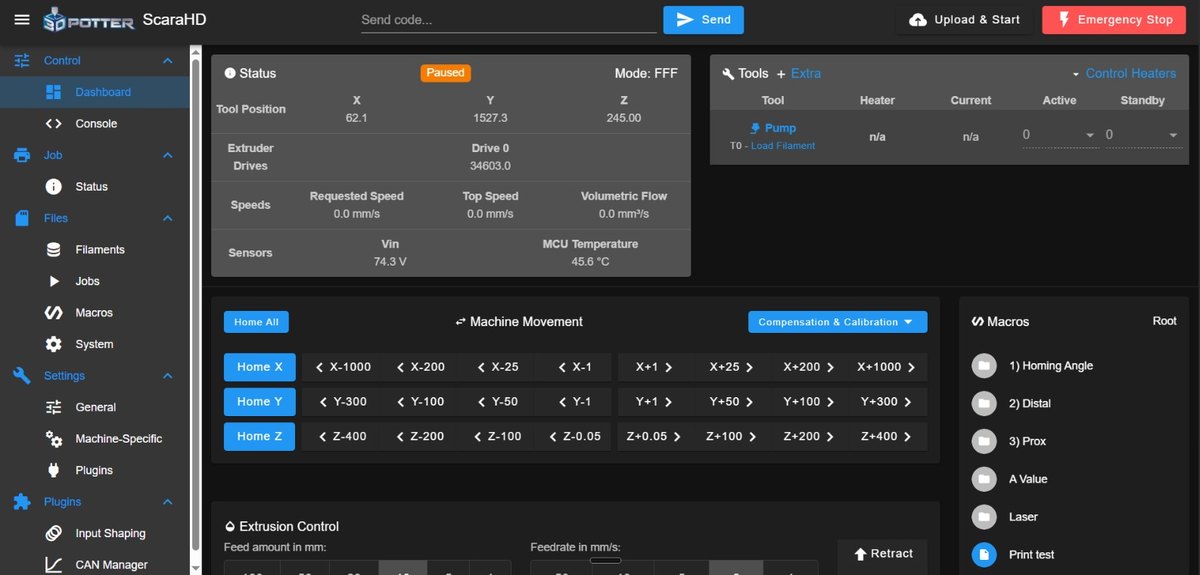
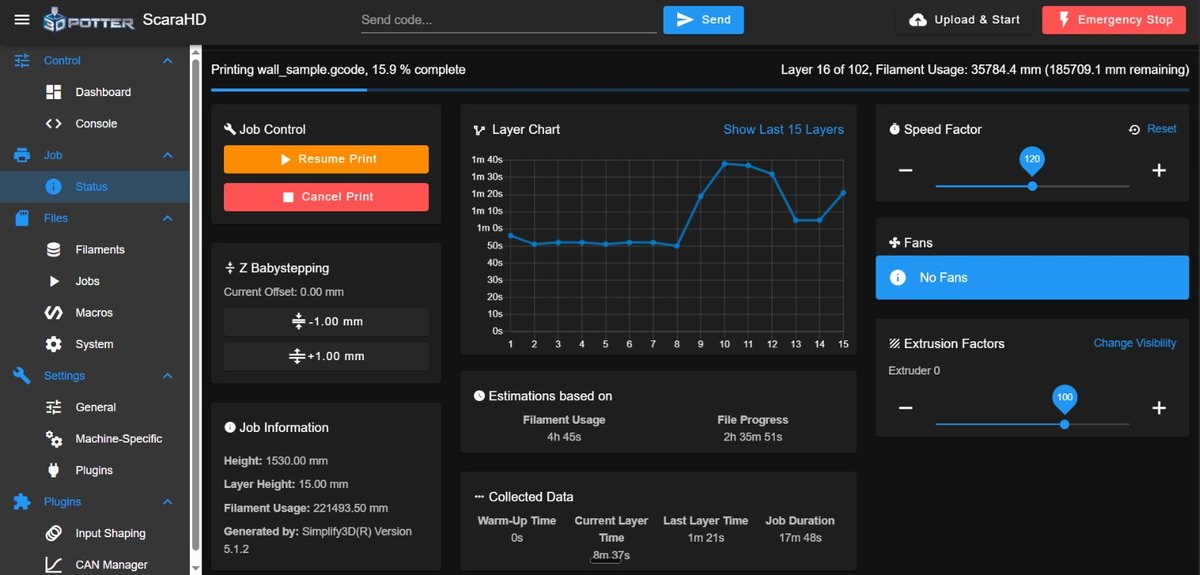
Duet Web Control runs in any browser — laptop, tablet, or phone. Print status, layer times, time remaining, and file management are live, and speed adjusts mid-print.
Cementitious mixes — Sikacrete®-733 W 3D and 752 3D — and geopolymer blends, mixed on site from locally available components. Our Sika partnership runs deep: their printing materials are developed and tested in our Palm City facility. The Mixcell HD injects accelerants and coloring during printing for fast transitions, complex overhangs, and integrated color.
Printed concrete achieves up to six times the strength of conventional block construction.
Permitted, inspected homes in Florida — including hurricane-rated construction — stand on this material system today.
Material is placed only where the design needs it — less waste, less site energy, no wood formwork.
| Printer power | 110V / 10A standard service |
|---|---|
| Mixing & pumping | MAI®MULTIMIX — fed from bags, big bags, or silo; requires a dedicated three-phase feed |
| Transport | Pickup truck — no crane, no oversize permits |
| Crew | Operator + small material crew, trained by us |
| Environment | Indoor (warehouse/prefab) or outdoor (on-site) |
| Connectivity | Wi-Fi for browser-based control from any device |
Talk with our engineering team — a working conversation about your projects, sites, and goals. No pressure, no obligation. Our team will reply as soon as possible.
Talk to Our Team